
The Camera - I know that nearly everybody says you don't need a good quality camera to take good photos, but with having a dad who is a professional photographer I'm going to say that you do. To have a photo that can be blown up very large and still not be pixelated you are going to need a good quality camera. This doesn't mean that you have to spend a fortune on a DSLR, they're are plenty of compact cameras that can still take equally as good photos. An example is The Canon S95, my Mum uses this camera, and I have used it for some of the photos in my old blog posts. It's really good and I would definitely recommend it!
Camera Settings - To take a good photo you need to know your camera
settings such as Aperture, shutter speed, Macro and depth of field.
Aperture refers to the set of small thin interlocking metal blades
called the 'iris'. You can adjust the size of this let more or less
light into the camera sensor. Aperture sizes tend to vary from 2.8 to
22. An easy way to remember it is 'the smaller the aperture number the
bigger the hole' and vice-versa. Here is a diagram to help:

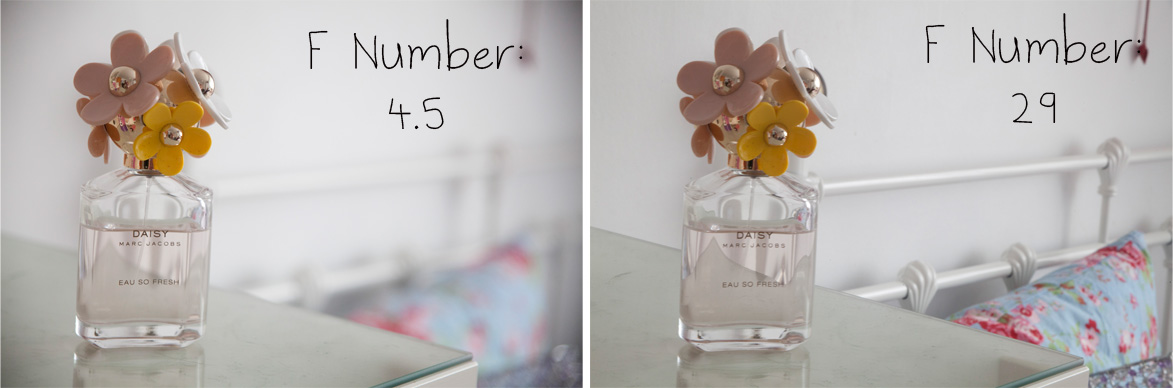
Depth of field - In basic terms depth of field is how you take a photo that has focused on a certain point and the rest in blurry. If you want your photo to only have a small amount in focus then you need to use a larger aperture (F stop) such as 4.5, whereas if you want all of the photo is focus use a smaller aperture like 22. Here is an example, notice in the photo on the left only the perfume is in focus but on the photo on the right the perfume and the background are in focus.
Shutter Speed - For your photo to be in focus (unless you are using a tripod) you need to use a high shutter speed such as 1/2000. If your shutter speed is too slow your photo will be blurry. The shutter speed can also affect the brightness of a photo, the longer the shutter speed the brighter the photo because again, more light has reached the sensor.If you are using a tripod then you can use a slower shutter speed because the camera won't move at all during the duration of the shutter.
Focus - It is important to make sure that the important part of the photo is in focus. If you are taking a photo of a product, like a lipstick it is important for it to be in focus. Before taking the photo point the camera at where you want it to be in focus and lightly press on the shutter button, it should make a little beeping noise and this means that is has focused there, then take the photograph! If you are taking a close up photograph make sure your camera setting is on macro, this means it will focus a lot closer up and the photos will be sharper too, it really does make a lot of difference.
Lighting - Most photos look best with natural daylight as the light source. If you are photographing indoors find a well lit room and photograph near the window where the light is best, make sure not too use the flash as this can make things look a different colour and create a harsh light.
Background - If you want a certain thing to stand out in the photo it is best to use a neutral background, such as a white duvet cover or against floorboards. That way it isn't distractiong, but if you want to use something a bit brighter, I oftne use a floral bed cover, make sure you focus on the product and use an F number of about 4.5.
I hope these tips were helpful, next time I'm going to do a post on how to edit your photos! So let me know if there is anything you want to know or if you have any questions, I will make sure to answer them all :)


